Decibel Meter: Sound Meter App
- 3.8
- Rating
- 1.00M
- Installs
- Free
- Price
 Analysis by App-foxy
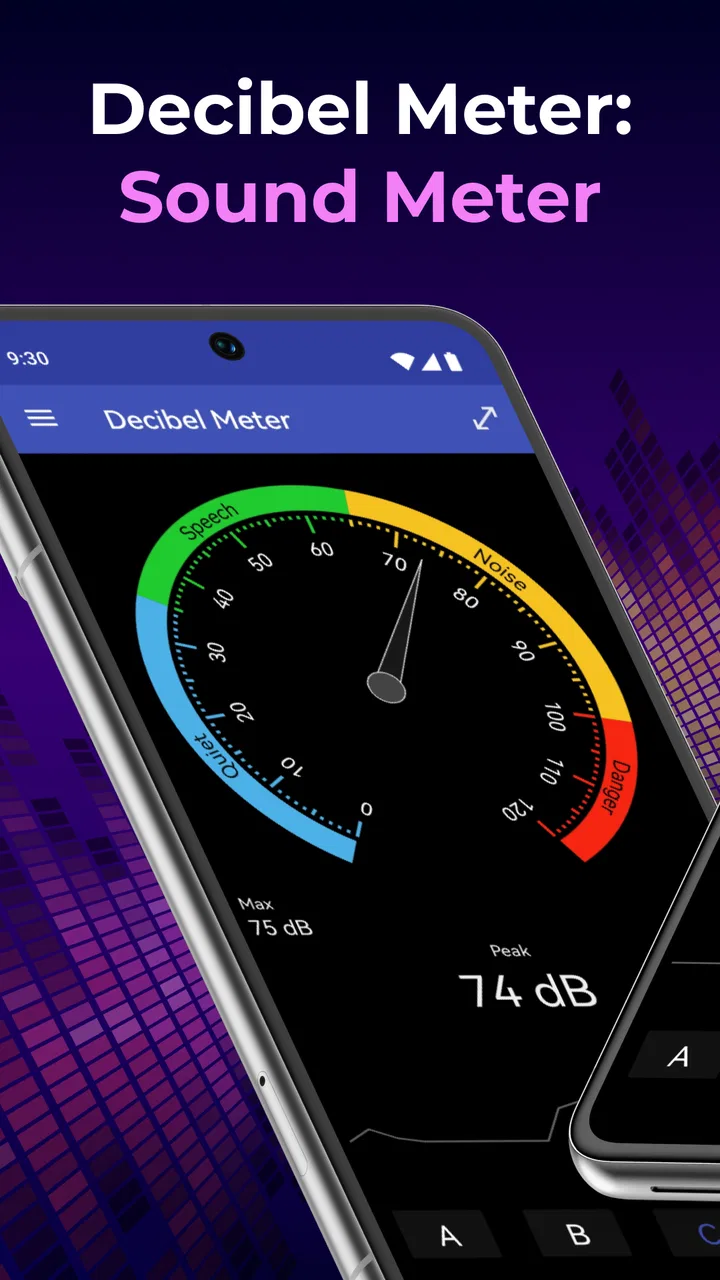
When I open Decibel Meter: Sound Meter App, I see a focused tool rather than a broad music application. Its purpose is simple: it helps me view surrounding sound as a decibel reading. That makes it useful when I want a quick sense of how loud a room, appliance, rehearsal space, classroom, or street has become, without carrying a dedicated sound meter.
I like that narrow approach. A sound-level tool should not bury its main job under playlists, recording features, social feeds, or complicated audio controls. This app, developed by GeniusTools Labs, belongs in the Music & Audio category, but I use it more as a practical measuring aid than as an entertainment app. It is free to install, rated for Everyone, and available on Android devices running version 8.0 or later.
Its audience is fairly easy to identify. If you are curious about the noise around you, need a rough comparison between two spaces, or want a convenient visual reference before changing the volume of a speaker, it can be handy. If you need laboratory-grade acoustic measurements, legal documentation, workplace compliance evidence, or calibrated equipment for professional decisions, I would choose a purpose-built meter instead.
You May Also Like

 Blood Strike: 2.5 Anniversary
Blood Strike’s Loadouts Turn Every Drop Into a Tactical Gamble
A close look at Blood Strike’s custom loadouts: how fast access to signature weapons reshapes its battle royale rhythm, rewards preparation, and narrows the gap between fights.

 Pandora - Music & Podcasts
Pandora’s Music Is Easy to Start, but Harder to Recover
Pandora’s strength is its low-effort path from a seed to a station. Its weak spot is how much confidence it asks you to place in connection, setup, and quiet recovery.

 8 Ball Pool
 Is Built on Rivalries, Rematches, and Routine
A close look at the rivalries, rematches, shared routines, and unanswered safety questions that turn a quick pool match into a persistent mobile community.

 Samsung Music
’s Quiet Strength Is Playing What You Already Own
Its reach comes less from spectacle than from dependable access to a personal library. That simplicity is both the app’s strongest retention engine and its ceiling.

 AccuWeather: Weather Radar
AccuWeather Review: A Quick, Clear Forecast for Everyday Decisions
For everyday plans, the best forecast is the one you can understand quickly. AccuWeather makes rain timing, radar, and local conditions easy to act on, with a few trade-offs.

 Hill Climb Racing
Why Hill Climb Racing Still Turns Crashes Into One More Run
A tiny car, a bumpy hill and one more upgrade: Hill Climb Racing keeps resurfacing because its simple chaos makes every near-miss feel personal.
More From Our News Desk
View All News


What the app is really useful for
The most helpful way to think about this app is as a quick comparative instrument. I can open it in one location, observe the reading, move to another location, and compare the two situations. That is often more useful than treating one displayed value as an unquestionable scientific result.
For example, imagine I am working from home and the room suddenly feels distracting. I can check the reading near my desk, then check it again beside an open window or near a running appliance. The result gives me a practical indication of whether the noise is actually changing when I close the window, move the appliance, or ask someone to lower the television. It turns a vague impression into something I can observe and discuss.
The same workflow works for checking a rehearsal room before a session. I can look at the sound level while the room is quiet, then compare it after instruments or speakers are active. I would not use the result to certify safe exposure or prove that a venue meets a regulation, but it can reveal obvious differences between setups and encourage better listening habits.
Another useful situation is troubleshooting a persistent hum or buzz. I can take readings at several spots, including close to a suspected source and farther away. If the displayed level changes noticeably, that gives me a clue about where to investigate. It does not identify the frequency or diagnose the electrical problem, so I would still need another tool for that, but the app can make the first stage of investigation less subjective.
There is also a simple household use. Parents, roommates, and anyone sharing a small space may want to know whether a fan, extractor, computer, or speaker is making the room louder than expected. The value here is not a perfect acoustic report. It is the ability to compare before and after changes using the same phone and the same general position.
Why phone readings need careful interpretation
A phone is not a dedicated sound-level meter. Its microphone, casing, software processing, and placement all affect what the app receives. I therefore treat the number as an estimate rather than an absolute truth. Holding the phone in my hand, covering part of the microphone, placing it beside a wall, or standing very close to a loud source can all change the result.
This is the first important trade-off. Convenience is the strength, while measurement authority is the weakness. The app can help me notice patterns, but it should not be the only basis for a health, safety, employment, tenancy, or legal decision. For those situations, a calibrated instrument and an appropriate measurement method are more suitable.
I also avoid comparing readings taken under completely different conditions. A result from a phone on a table is not automatically comparable with one held at chest height in the middle of a room. For a more useful personal experiment, I keep the phone orientation and position consistent, wait for the environment to settle, and compare changes rather than chasing a single dramatic value.
That habit is more important than the apparent precision of the display. A detailed-looking number can create false confidence. I find the app most convincing when it answers a modest question such as “Is this space louder than the other one?” rather than an ambitious question such as “What exact exposure level did I receive?”
Controls, privacy moments, and visible choices
Because this tool depends on sound input, the moment that deserves the most attention is microphone access. I would review the permission prompt carefully and grant access only when I am ready to use the measuring function. On Android, permission controls can be revisited through the system settings, so I can remove microphone access later if I no longer want the app to use it.
I prefer that approach to granting access automatically and forgetting about it. A sound meter naturally needs audio input during measurement, but that does not mean I should ignore the phone’s permission controls. When I test it in a private room, I also remember that the microphone may encounter conversations or other sensitive sounds. I avoid treating a measurement session as a reason to record or share anything personal.
The app’s trustworthiness, in my view, should be judged through choices I can actually see: whether the operating system asks for microphone permission, whether I can revoke it, and whether I can decide when to open the tool. I do not assume anything beyond those visible controls. I also do not treat a simple interface as proof of a particular data practice. Responsible use means checking the permission screen and the app’s current privacy information before using it around confidential conversations.
This matters especially in workplaces, classrooms, clinics, and shared homes. A person nearby may not realize that a sound-measuring app is active. I would explain what I am doing, keep the session limited to the measurement task, and avoid presenting the app as a way to monitor people. The most respectful use is to measure the environment, not to turn the phone into an unnoticed listening device.
There is a second data-sensitive moment when considering optional purchases. The app remains free to install, while its in-app purchase range runs from $0.99 to $99.99 per item. I would check the purchase screen before confirming anything and make sure the payment choice matches what I actually need. A free download does not mean every part of the experience is necessarily free, so I would not tap through a purchase prompt casually.
How I would use it more reliably
My preferred workflow begins with a quiet pause. I open the app, let the environment remain unchanged for a short moment, and keep the phone away from direct contact with a table, speaker grille, or clothing. This reduces accidental differences caused by handling rather than by the room itself.
Next, I take several observations in the same position instead of relying on one instant. Sudden sounds can make a reading jump, and a single passing vehicle or conversation can distort the comparison. Repeating the check gives me a better sense of the ordinary level in that location.
I then change one thing at a time. If I want to test a window, I check before closing it and after closing it. If I want to assess an appliance, I compare it while running and while switched off. This simple method produces information I can act on, even though it does not turn the phone into professional acoustic equipment.
One non-obvious tip is to record the context in my own notes rather than trusting memory. I write down where the phone was placed, what was operating nearby, and whether people were talking. That prevents me from treating two readings as equivalent when the environments were actually different. The app supplies the measurement view; the quality of the comparison depends on how carefully I control the test.
A second useful tip is to use distance consistently. Sound can change quickly as I move closer to a source, so I avoid taking one reading beside a fan and another several steps away. If I am testing a speaker, I choose a repeatable listening position. If I am examining a room, I check the same spot each time. This makes the app more useful for before-and-after decisions.
A third trade-off concerns very loud environments. I would not keep my phone close to a powerful speaker or other intense source simply to obtain a more impressive reading. Protecting my hearing and the device matters more than squeezing extra detail from a casual measurement. For serious high-volume work, a proper meter designed for that environment is the safer choice.
What the current version means for everyday users
The current version is 3.0.1, and the app has been available since Jul 18, 2020. Those details give me useful context: this is an established app rather than something that appeared yesterday, but age alone does not prove that every device behaves identically. Android hardware differs widely, especially in microphone sensitivity and manufacturer-level audio processing.
I would therefore test the app on my own phone before relying on it for a repeated routine. If two phones show different results in the same room, I would not immediately assume one is broken. The microphones and internal processing may simply respond differently. For personal comparisons, staying with one device is usually more meaningful than mixing readings from several phones.
The app has passed one million installs and carries a 3.6 average from around ten thousand ratings, with 261 written reviews. I read those figures as a sign of broad interest but not universal satisfaction. The rating is moderate, so I would approach it with realistic expectations: useful for casual sound checks, but not a guaranteed replacement for specialist equipment or a flawless experience on every handset.
That balance also affects who should skip it. I would not recommend it as the primary tool for an acoustic engineer, an occupational safety professional, a venue manager documenting compliance, or anyone who needs traceable calibrated results. I would also skip it if I wanted audio recording, spectrum analysis, editing, or a complete music-production workspace. Its narrow purpose is an advantage only when that is the purpose I need.
On the other hand, I think it suits students exploring sound, renters investigating a noisy building, musicians checking rehearsal conditions, and ordinary users comparing household noise. It is especially approachable for someone who wants a quick reading without learning a full measurement workflow first. The Everyone content rating also makes it easy to consider for general household use, while sensible supervision and privacy awareness still matter whenever a microphone is active.
Compared with the usual alternatives
The most obvious alternative is a dedicated handheld decibel meter. That option is better when calibration, repeatability, durability, or formal reporting matters. It may cost more and require carrying another device, but it is designed specifically for measurement. I see the phone app as the convenient first check and the dedicated meter as the stronger choice when the result has consequences.
Another alternative is a recording or audio-analysis app. Those tools can be more appropriate when I need to inspect frequencies, identify tonal problems, capture a sample, or work with music. They may provide richer information, but they can also make a simple loudness check unnecessarily complicated. For a quick room comparison, this focused app is easier to approach.
The phone’s built-in microphone and ordinary hearing are the least reliable alternatives. Listening tells me that something feels loud, but it does not give me a consistent reference. The app adds a visible measurement that I can compare across a controlled test. It does not eliminate the limitations of the microphone, yet it is more useful than relying only on my impression.
I also would not compare this tool directly with a music player or volume booster. Those apps change or manage audio; this one observes the sound reaching the microphone. Confusing those roles can lead to poor decisions, especially if I assume that a displayed reading represents the output setting of a separate speaker or headset.
My cautious verdict
I recommend this app when the goal is modest and practical: checking whether one environment is louder than another, investigating a household noise, or gaining a rough visual sense of sound around me. Its free entry point, focused purpose, and compatibility with Android 8.0 or later make it easy to try, while the microphone permission and purchase prompts deserve deliberate attention.
I would not present it as a professional measurement solution. The phone’s hardware and the conditions of use can affect the result, and a moderate 3.6 average suggests that the experience may not satisfy everyone. The right way to use it is to keep the phone position consistent, repeat observations, note the surrounding conditions, and interpret changes instead of treating every displayed value as exact.
For me, the strongest reason to keep a tool like this installed is not the promise of precision. It is the convenience of turning a vague concern into a repeatable check. If I want to know whether closing a door reduces the noise, whether an appliance is disturbing a room, or whether two locations differ, the app can give me a useful starting point.
My final recommendation is cautious but positive: use it as a personal sound comparison tool, protect microphone privacy, review any optional purchase before accepting it, and move to calibrated equipment whenever safety, evidence, or professional accuracy is involved. In that role, Decibel Meter: Sound Meter App is practical and approachable, as long as I respect what a phone-based reading can—and cannot—tell me.
FAQs for Decibel Meter: Sound Meter App
01What is the Decibel Meter: Sound Meter App used for?
The Decibel Meter: Sound Meter App is designed to measure sound levels in your environment using your smartphone's microphone. It provides accurate decibel readings, allowing users to assess noise pollution in various settings, from concerts to workplaces. It's a handy tool for anyone needing to monitor sound levels for health or compliance reasons.
02How accurate is the Decibel Meter: Sound Meter App?
The accuracy of the Decibel Meter: Sound Meter App largely depends on the quality of your smartphone's microphone. While it can give a good estimate of sound levels, it's important to note that it might not be as precise as professional-grade equipment. For casual monitoring, however, it should suffice.
03Does the app require an internet connection to function?
No, the Decibel Meter: Sound Meter App does not require an internet connection to measure sound levels. It functions offline by utilizing your device's built-in microphone. However, an internet connection may be needed for updates or additional features that require online access.
04Is the Decibel Meter: Sound Meter App free to use?
The app is free to download and use, but it might offer in-app purchases or ads. Some advanced features, such as logging or exporting data, might require a purchase. Review the app's download page for specific details on pricing and available features.
05Can the Decibel Meter: Sound Meter App damage my phone's microphone?
Using the Decibel Meter: Sound Meter App won't damage your phone's microphone. The app simply uses the microphone to measure sound levels. However, exposing your phone to extremely loud noises could potentially harm the microphone, just as it would with any audio recording app.
Pros
- Accurate real-time sound level monitoring.
- Simple and intuitive user interface.
- Customizable warning threshold settings.
- Provides historical data for analysis.
- Supports multiple units (dB
- dBA
- etc.).
Cons
- Contains ads that can be distracting.
- Limited features in the free version.
- Requires microphone access permission.
- Not suitable for professional-grade measurements.
- Battery consumption can be high during use.

Decibel Meter: Sound Meter App
Gallery